


Dollar General-Digital Coupons
4.755.80K Reviews
App Specs
- Version
- 15.20.101
- Updated On
- License
- Free
- Downloads
- 10,000,000+
- Developer
- DOLLAR GENERAL CORPORATION
- Categories
- Shopping
- Platform
- Android, iOS
Screenshots
 Analysis by AppCompare
I find the biggest payoff from Dollar General-Digital Coupons comes when I check it before leaving home rather than trying to make decisions in the checkout line. It is a free shopping app from DOLLAR GENERAL CORPORATION, and its focus is narrow in a useful way: it brings online shopping, digital coupons, and the local weekly ad together in a myDG account. That makes it most helpful when Dollar General is already part of your routine, not when you want one app to compare every retailer in town.
Where coupon shoppers can get stuck
The basic idea is simple, but digital discounts depend on a small sequence: find an offer, add it to your account, and use the account at checkout. If you browse without clipping the offers you actually intend to use, it is easy to assume a deal is ready when it is not. I treat clipping as a planning step, not something to leave until I am standing in line.
Another common point of friction is matching the coupon to the item in the basket. A product name can cover several sizes or varieties, while an offer may apply only to a particular option. Before counting a discount in my budget, I read the coupon’s terms and check the product details against what I plan to buy. That quick check is especially worthwhile when I am choosing between similar packages or picking up a substitute.
The app’s search can help narrow down offers, but I would not treat a search result as a guarantee that every item with a similar name qualifies. I use search to find possibilities, then open the coupon and confirm its conditions. This adds a little time, but it is better than relying on a discount that may not match the product I picked up.
Set up a useful shopping routine
When setting up an account, I would use contact details I can enter consistently at the register and take a moment to make sure I can sign back in later. The original setup feels quick, but the practical test is whether I can access the same account when I shop. If another person in the household also shops, agree on which account holds the coupons and which phone number to use; splitting clipped offers across accounts can make a shared list harder to manage.
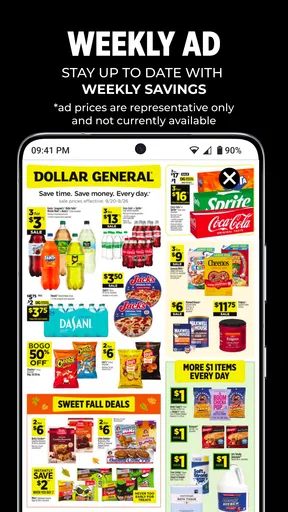
I like to start with the weekly ad and then look for coupons tied to things I already need. That order helps me avoid letting a tempting offer create an unnecessary purchase. I make a short list of planned items, clip the relevant deals, and keep a mental note of any terms that could change my choice. It turns the app from a browsing distraction into a preparation tool.
For an everyday example, imagine I am picking up pantry staples and a few household basics after work. Before I go, I check the local ad, search for coupons on the items already on my list, and clip the matches. At the store, I choose the qualifying products rather than assuming a close substitute will work. At checkout, I use the account details associated with those clipped offers. The key benefit is not a complicated strategy; it is avoiding last-minute coupon hunting and knowing what I planned to buy.
Worth Reading Before You Choose

EA SPORTS FC Mobile 26 Is a Bigger Football Game, but It Takes Time

Flipboard Shows What News Apps Must Do Beyond the Feed

Switching to Android Auto Means Rethinking Your Driving Routine

Google Calendar Makes a Crowded Week Easier to Manage

Ludo King Makes the Most of the Minutes Between Plans

Baby Panda World Brings Quick Play to Modern Phones, but Its Game Library Feels Busy
Notifications can be useful if I want to hear about new offers, but they can also draw attention to deals I did not intend to use. I would keep them only if they help me plan, and I would still review the account before a trip rather than relying on an alert to remember everything. The more disciplined approach is to let the shopping list set the agenda and use coupons as a bonus.
Simplifying Savings
First off, let’s talk about the setup. Downloading and setting up the Dollar General-Digital Coupons app is a breeze. Within minutes, I had it installed, and signing up was as easy as pie. No lengthy forms or unnecessary questions. Just a quick setup, and I was ready to save.
Browsing and Clipping Coupons
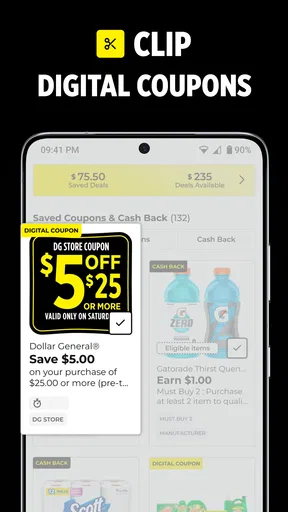
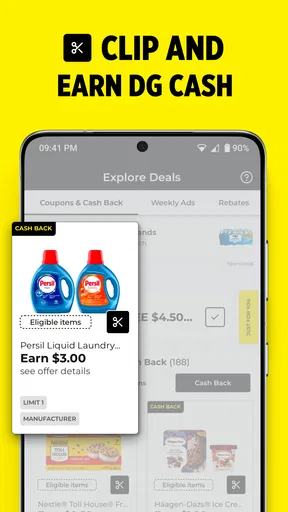
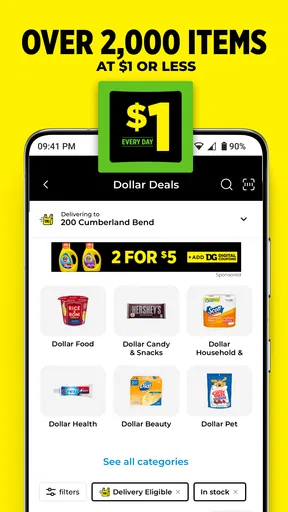
Once you're in, the app interface is pretty intuitive. You can easily browse through a vast array of coupons. Categories are well-organized, and I found it super handy to have everything from groceries to seasonal items at my fingertips. With just a tap, you can "clip" the coupons you want, adding them to your account for easy access at checkout.
One of the features I absolutely loved was the search function. I could type in the product I was looking for, and boom! All available coupons would pop up. It’s like having a personal shopping assistant right in my pocket.
Smooth Checkout Experience
Now, let’s get to the real test – the checkout. I was a bit skeptical at first, but using the digital coupons was seamless. All I had to do was enter my phone number at the register, and the discounts were applied automatically. No paper, no fuss. Just simple savings.
I also appreciated the store locator feature, which made it easy to find the nearest Dollar General store. It’s perfect for those impromptu shopping trips when you find yourself in a new area.
Keeping Track of Savings
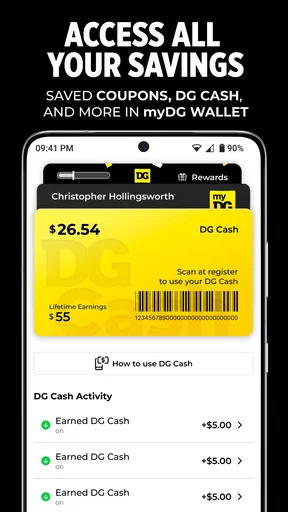
Another cool feature is the savings tracker. It keeps a tally of how much you’ve saved over time. It’s pretty satisfying to see those numbers add up, and it definitely motivates me to keep using the app. Plus, the app sends me notifications about new coupons and exclusive deals, ensuring I never miss out on a good bargain.
Dollar General-Digital Coupons isn’t just about saving money; it’s about making shopping a more efficient and enjoyable experience. The app is user-friendly, and the savings are real.
When another option may suit you better
Compared with a paper flyer and coupons kept in a wallet, the app is easier to search and less likely to leave me sorting through scraps at the till. Compared with a general coupon app, its advantage is being centered on Dollar General’s own offers and local weekly ad rather than trying to cover many stores. The trade-off is just as clear: if I regularly shop across several chains, I still need another way to compare those retailers’ prices and promotions.
This is a good fit for someone who visits Dollar General often, likes checking the ad ahead of time, and is comfortable using an account at checkout. It is less useful for a shopper who rarely goes there, prefers to avoid accounts and digital steps, or wants a broad price-comparison tool. A coupon should not be the reason I buy something I would otherwise leave on the shelf; the app helps most when it supports a purchase I already planned.
Recovering when a discount does not appear
If a discount seems to be missing, I would first check the simple things: whether I clipped the offer, whether the item matches its conditions, and whether I used the account information linked to the coupons. I would also look over the receipt before leaving, while the purchase is still easy to review. These checks are more useful than immediately assuming the app has failed, because a mismatch between the offer and the product can look like a technical problem.
If the account or app is not behaving as expected, I would close and reopen it, confirm that I am signed into the account I meant to use, and try again when I have a steady connection. If an offer still does not appear, I would keep the coupon details available and ask store staff what options are available for that transaction. I would not count on a discount until it is reflected at checkout.
There are also situations where the app is not the cause. A product may be out of stock, a chosen alternative may not meet the coupon terms, or the checkout process may not be using the account where I clipped the offer. Checking those details before changing settings saves time and helps me distinguish a shopping mismatch from an app issue.
Who should make it part of the trip
The app is rated 4.7 on average from around 801,000 ratings, and it has been installed over 10 million times. Those figures suggest that many shoppers find the basic idea worthwhile, but they do not tell me whether every coupon will suit my list. I would judge it by how often the local ad and available offers match what I already buy.
It is free, rated for Everyone, and version 15.14.26 is listed for devices running Android 7.0 or later. The app was released on November 13, 2012, and has accumulated around 54,000 written reviews. I see that long-running presence as context, not a promise that every device or checkout will feel identical; keeping the app updated and checking account access before a shopping trip are sensible habits.
For a household that makes regular Dollar General runs, I would use the app as a pre-trip organizer: scan the ad, search for relevant offers, clip only what fits the list, and verify the items before checkout. For an occasional visitor, a quick browse may still be handy, but maintaining another account and checking another set of deals may not earn its place in the routine. That is the real decision: whether the store’s offers overlap enough with your normal shopping to make preparation worthwhile.
So, next time you’re planning a shopping trip, give this app a whirl. It’s like having a trusty sidekick that ensures you never pay more than you have to. Happy shopping!
Pros
- Easy to navigate interface.
- Wide variety of digital coupons.
- Quick coupon redemption process.
- Regular updates with new offers.
- Saves favorite coupons for easy access.
Cons
- Occasional app crashes.
- Limited customer support response.
- Requires internet for coupon use.
- Not all stores accept digital coupons.
- Push notifications can be overwhelming.
FAQs for Dollar General-Digital Coupons
What features does the Dollar General-Digital Coupons app offer?
The Dollar General-Digital Coupons app provides a range of features including digital coupons for various products, a store locator, and weekly ads. Users can easily browse and clip coupons directly within the app, ensuring they maximize savings on their shopping trips. Additionally, the app provides personalized deals based on shopping habits.
How do I redeem digital coupons using the app?
To redeem digital coupons, you first need to create an account or log in. Once logged in, browse and clip the coupons you wish to use. At checkout, enter your registered phone number on the keypad at the register, and the clipped coupons will automatically apply to your purchase, providing instant savings.
Is the Dollar General-Digital Coupons app free to use?
Yes, the Dollar General-Digital Coupons app is completely free to download and use. There are no hidden fees or charges involved. Users can enjoy browsing and clipping digital coupons, accessing store information, and viewing weekly ads without any cost, making it a cost-effective tool for savvy shoppers.
Does the app require an internet connection?
Yes, the Dollar General-Digital Coupons app requires an internet connection to browse and clip coupons, view the latest deals, and update your shopping list. However, once you've clipped coupons, they are linked to your account and can be redeemed in-store without an internet connection, as long as you enter your registered phone number.
Can I use the app at any Dollar General location?
The app is designed to be used at all Dollar General locations across the United States. With the store locator feature, you can easily find the nearest store to you. The digital coupons and offers are valid at any location, ensuring you get the same great savings no matter where you shop.


